
House Session Builder, DNB Session Builder, and Silence Stripper handle two jobs that can stall a track: arranging the music and editing unwanted silence.
Tell me if this sounds familiar. I had a track that was going nowhere, which was frustrating because the material I’d written was good. It had a catchy Mainstage EDM synth melody that seemed perfect for a chorus, along with a high-energy 16-bar pattern I was happy with. What I couldn’t work out was how to turn those ideas into a complete song.
That project became one of my testing grounds for House Session Builder, and DNB Session Builder from Tools For Live, formerly known as 174Shop. I tried both with existing projects and blank sessions to see whether their suggested arrangements could help develop ideas that weren’t getting anywhere.
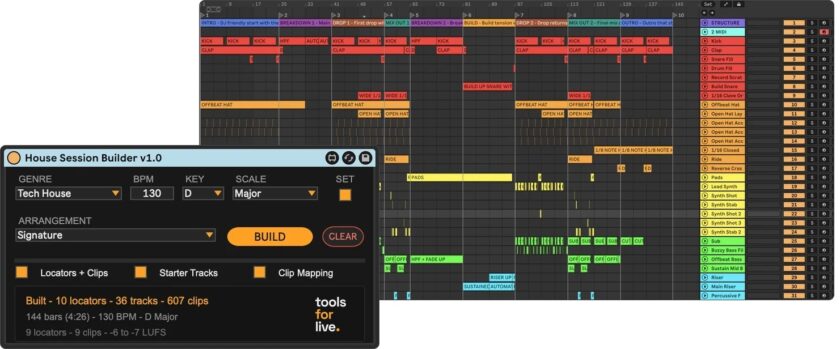
About 30 seconds after I hit BUILD, I had a complete arrangement structure ready in Ableton Live. Sections were named, tracks were organized, and the timeline had labeled placeholders for kicks, snares, hi-hats, bass, synths, pads, effects, and other elements.
None of those clips contained generated music. Given how much criticism Suno and AI-generated music attract, I want to make that clear: the Session Builders create an arrangement for you to populate with your own material. That’s it. They don’t generate musical MIDI content, write chord progressions, design patches, or create drum patterns. You’re still responsible for the musical decisions that make the track yours.
Tools For Live Session Builders: From 16 bars to a complete arrangement
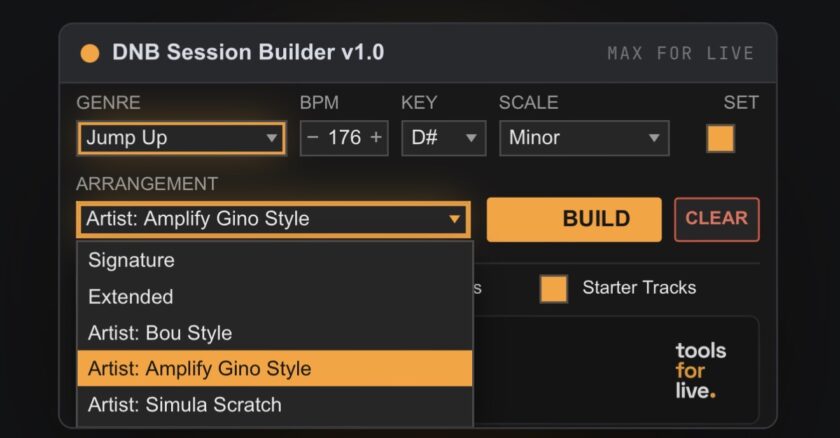
Both devices provide genre-specific arrangements with named sections and guidance on how a track should develop. House Session Builder goes further with its optional Clip Mapping feature, which can populate the session with color-coded tracks and empty, named clips positioned throughout the arrangement. DNB Session Builder provides section markers, labeled clip slots, and optional starter tracks.
For my main experiment, I decided to leave the generated arrangement untouched. I wanted to know whether the suggested structure could support an entire track without me making structural changes.
I also brought Producer Pal into the workflow. It’s a separate tool that can connect Ableton to AI assistants, including Claude and ChatGPT through Codex. I didn’t use AI to create any music. Instead, I used Producer Pal to help move the parts I’d already written into the arrangement generated by Tools For Live.
Every kick, snare, hi-hat, synth, and bass part came from material I’d already created. Producer Pal helped position that material according to the Session Builder’s structure.
Once everything was in place, that original synth melody was no longer the extent of the song. It now had a full arrangement around it, populated with my existing musical parts. The suggested placements helped flesh out the track, sparking an idea I wanted to explore. And I hadn’t needed to change the structure to get there.
Having a complete arrangement hasn’t stopped me from tweaking things. But refining a song with an established structure is a lot easier than trying to figure out what should happen after the first 16 bars.
Choosing an arrangement without copying the music
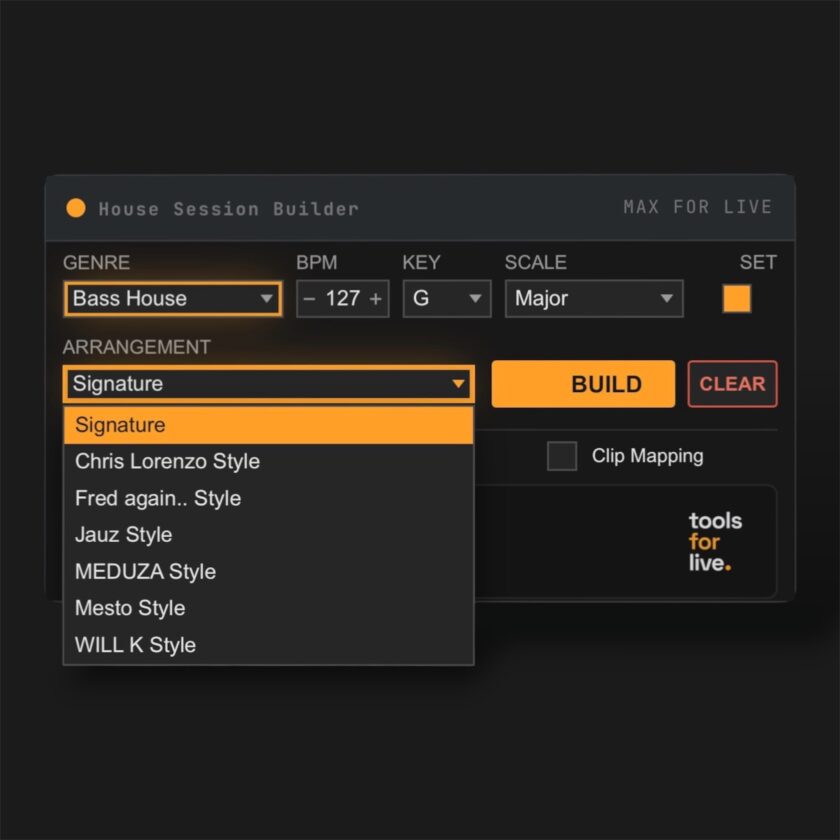
House Session Builder offers 63 arrangement styles across seven subgenres, while DNB Session Builder includes 40 arrangements across six. Both feature general-purpose Signature templates alongside arrangements inspired by particular artists.
I wasn’t familiar with every artist represented in the devices, so I spent time listening to their music before making my selections. Often, though, I defaulted to Signature to get a general arrangement appropriate to the genre without committing to the structure associated with a specific producer.
For house, I tend to compose around 124–127 BPM and frequently gravitate toward minor keys. Several of the Tech House and Bass House options appealed to me, including templates labeled with artists such as Diplo and Will K. Their arrangements offered starting points that suited the kind of energy and progression I wanted, even when my musical ideas were very different from theirs.
The devices also taught me something. Listening to reference tracks and examining the corresponding arrangements encouraged me to pay closer attention to how producers handle transitions, section lengths, and changes in energy.
Tools For Live says its artist-inspired arrangements were developed by studying released music and transcribing the structures by ear. What appealed to me about Tools For Live was how quickly I could select a style and start working within its suggested layout, especially with House Session Builder’s more extensive Clip Mapping option.
Silence Stripper and the smaller jobs
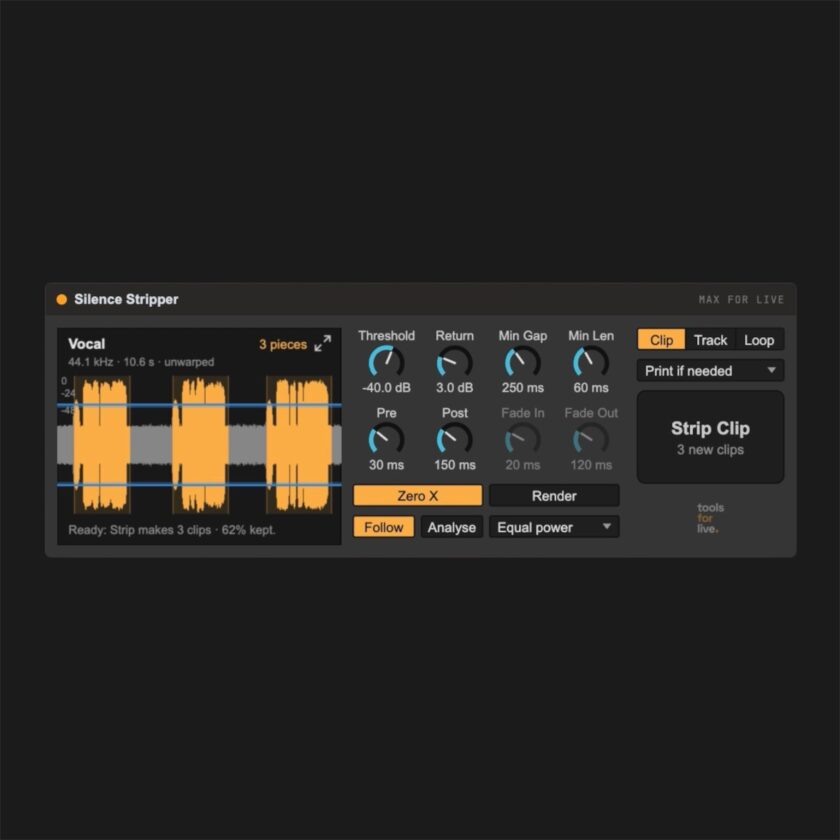
Silence Stripper tackles a separate part of the production process. It removes unwanted stretches of silence from audio clips in Ableton’s Arrangement View.
I tested it with samples and found it handy for turning longer audio regions into individual clips that I could copy, slice, and move around. Previously, I might have had a sample sitting in a long region with unnecessary silence before or after the material I wanted. Silence Stripper made those pieces easier to work with.
You select an audio clip, adjust the detection threshold if needed, and run the strip operation. The device identifies quieter sections and separates the retained audio while keeping it in position on the timeline. You can fine-tune the result further with controls for cut boundaries, zero crossings, and fades.
I found it a good companion to the Session Builders. Once an arrangement is laid out, there’s still the matter of getting your audio into usable pieces and placing it where it belongs.
Compatibility and value
House Session Builder, DNB Session Builder, and Silence Stripper are all available to purchase. The developer also provides free updates with the devices.
All three are Max for Live devices. Max for Live comes with Ableton Live Suite and is available as a separate add-on for Live Standard, but isn’t supported in Intro or Lite. Both Session Builders are advertised for macOS and Windows, while Silence Stripper specifically requires Live 12 with Max for Live and is currently advertised for macOS.
If arrangement is where your tracks stall, I’d recommend trying the Session Builders. That goes double if you’re regularly accumulating unfinished loops. That describes me to a T, and these devices did what I needed them to do.
Sure, I continue to obsessively tweak my music, and I doubt that’s going to change anytime soon. But now my obsessive perfectionism has a complete arrangement to work with, built from an idea that previously hadn’t progressed beyond those 16 bars.
Now, to get this released.
See more plugin & Ableton device reviews here!
