
Disclosure: Knightmare Audio provided a complimentary Knight Drum license for coverage. The company had no editorial control over this article.
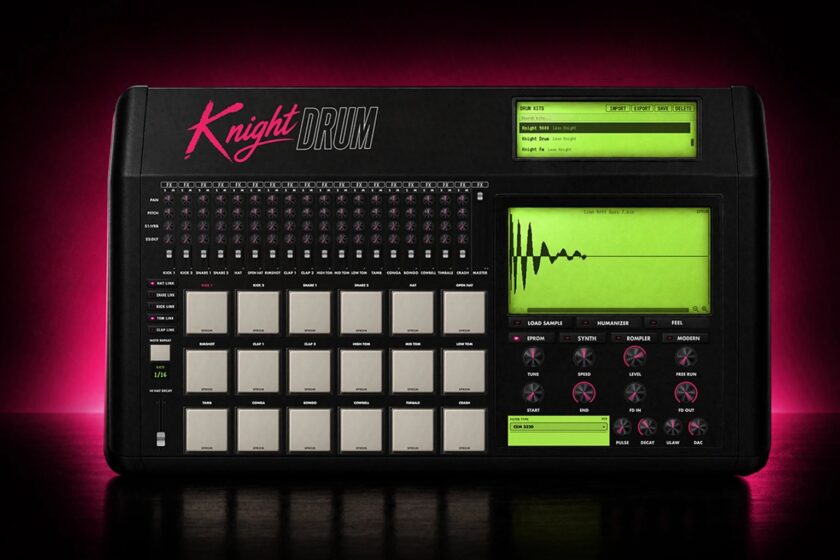
The first Knight Drum’s workflow centered on direct EPROM support. Knight Drum 2 now adds a song arranger, 108-pad sampler, FM synthesis, and resampling.
Most drum-machine plugins built around vintage hardware eventually lead back to samples. Usually, it’s recordings of the authentic hardware that get sampled and processed. Knightmare took a much more direct route.
The first Knight Drum could load the sample data stored on vintage drum-machine EPROMs directly. Not recordings of those machines. The raw data from the chips themselves.
That’s why I originally reached out to Knightmare Audio (Leon Knight) to cover the plugin about two months ago. Since then, Leon Knight has dropped Knight Drum 2, and the new version expands in nearly every direction. The current installer is version 2.0.1, and existing Knight Drum owners get the update free. Licenses, kits, grooves, and projects carry forward.
All of that arrived only a few months after Knight Drum’s public debut.
The EPROM Idea
EPROM-based drum machines such as the Linn LM-1, Linn 9000, and Oberheim DMX come from a period when drum sounds were stored as digital sample data on physical chips. Modern sample packs preserve plenty of those sounds, but loading an LM-1 snare recording is a different exercise from working with the data that originally lived on the chip.
Knight Drum can open compatible .bin EPROM dumps inside the plugin. You can edit, chop, and crossfade sounds, then export them as WAV audio or .bin data. Getting edited data back into original hardware still requires an EPROM programmer, compatible chips, and, naturally, a machine you’re willing to open up. But the path exists.
Knightmare Audio says the EPROM engine emulates the filters and sonic behavior of the Linn LM-1, Linn 9000, and Oberheim DMX/DX. Knight Drum also ships with 8,190 EPROM dumps and WAV files combined before you add any of your own material.
While I am not lucky enough to own any of the genuine hardware, Knightmare’s Linn 9000 comparison, which Leon Knight described as slightly pitch- and level-matched to direct audio, sounds pretty damn good. They are still developer-run comparisons, but I appreciate that Leon Knight put them out there in the first place.
Beyond EPROMs
Knight Drum isn’t exclusively an EPROM instrument. Each pad can pull from one of four engines: EPROM, Synth, Rompler, or Modern.
So you’re not stuck building an entire kit around one type of sound. An EPROM kick can sit next to synthesized percussion, an early-digital rompler hit, and a clean modern sample without loading another three plugins.
The Synth engine handles electronically generated percussion inspired by hardware including the Simmons SDS family, ClapTrap, and TR-808. Knight Drum 2 expands that section with a new two-operator FM drum model.
The Rompler engine points in a different direction. Knightmare Audio specifically cites machines such as the Roland R-8 and Yamaha RY30. My E-MU Procussion comes from the same broad era of digital percussion, and old digital percussion boxes are difficult to reduce to a neat adjective. They can be brittle, glossy, plasticky, punchy, enormous, or downright strange, sometimes within the same preset bank.
The four engines come from noticeably different periods of drum-machine design. EPROM machines reflect one era of digital playback. Devices such as the R-8 and RY30 represent another. Analog and synthesized percussion follow a completely different path.
Knight Drum 2’s New Features
Knight Drum now includes a song arranger that can combine pattern, MIDI, and audio tracks on a timeline. Regions can be cut, split, and looped, while a sync mode can follow the host DAW’s playhead. MIDI tracks can also drive VST3 instruments. You can now build more of an arrangement before sending anything back to Ableton Live or another DAW.
Export has expanded along with it. You can drag out MIDI, render full audio, and generate a separate WAV stem for each channel.
Version 2.0.1 also adds Multi Out setup for Ableton and Logic. In my workflow, especially when I want my Alesis 3630 compressor sidechained to a kick, I often send individual hits to separate outputs. That keeps compression, saturation, and effects under my control once the kit reaches Ableton. I applaud any developer that includes proper multi-out support.
The sampler has six banks containing 108 polyphonic pads, chromatic playback, and note-repeat functionality. You can record audio from a microphone, computer audio, or Knight Drum’s own output. From there, you can resample the same material through several character modes, including MPC 60, SP-1200, and EPROM-style processing. You can then split samples by transients, beats, or manual taps.
I can start with one of Knight Drum’s vintage sources, run it through another sampling character, resample the result, chop it again, and keep mangling it without constantly bouncing audio between applications.
Live FX and DAW Automation
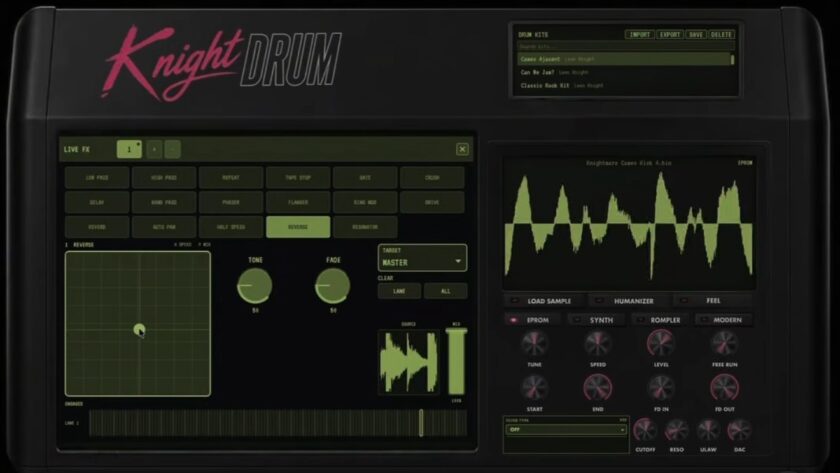
Knight Drum 2 adds 17 Live FX built around an XY control surface. Available processing includes tape-stop effects, repeats, reverse playback, filtering, and ring modulation, among others. You can perform movements in real time, or latch them or write them into sequencer steps and song bars.
Version 2.0.1 also exposes Live FX to DAW automation. That interests me more than treating the XY pad as something you have to perform and commit entirely inside Knight Drum.
The same project can hold your kit, patterns, samples, resampled audio, and arrangement, while the DAW still handles the larger mix around it. That’s exactly the sort of drum-programming rabbit hole I tend to disappear into.
Timing Goes Deeper Than A Humanize Knob
Humanizer introduces variation into velocity, pitch, and timing on individual voices. Feel Emulation takes a more specific approach by reproducing timing behavior associated with older drum machines.
Random timing and machine timing are not interchangeable. Moving hits around by a few milliseconds can make a rigid MIDI pattern less mechanical. Feel Emulation works differently from a typical humanize control. Instead of simply moving hits around at random, Knightmare says it models the repeatable timing behavior of specific vintage drum machines. That behavior is closer to a fingerprint.
Two machines can generate similar sounds and still produce grooves that feel different once their sequencers begin firing. In use, the Feel profiles do give different grooves noticeably different pushes and pulls.
So What Is Knight Drum 2 Now?
Knight Drum centered on working directly with EPROM data. Version 2 adds enough around that idea to become a full drum-production environment. After spending time with the sampler, individual outputs, and the different sound engines, it’s something I’d recommend to producers looking for 1980s and early-1990s digital drum sounds without buying the original hardware.
Leon Knight’s own Instagram handle might be @leonknightsucks, but our experiences with Knight Drum and its follow-up, Knight Drum 2, have been a lot of fun. From where we’re standing, there’s zero suckiness in sight.
Check out more plugin features here.
