
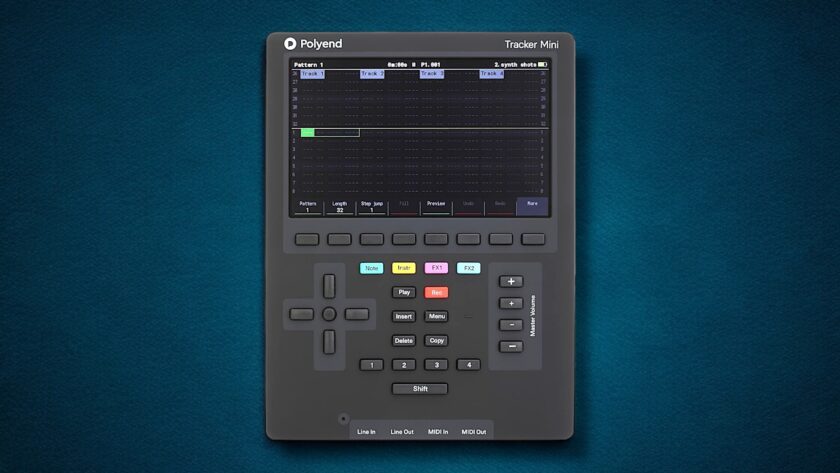
The Tracker Mini is a compact music workstation built around a tracker interface: streamlined, portable, and shaped by deliberate design choices. It delivers serious production capabilities in a form that fits in the palm of your hand.
You don’t need experience with trackers to get started on the Tracker Mini. The layout feels different at first, but once it clicks, everything moves quickly.
With the Anniversary Edition on the way, we spent some time with the current Tracker Mini. Check out our review below:
Form and Function
The Polyend Tracker Mini feels great to hold. Its rubberized coating adds grip and a sense of durability, and it feels like something you wouldn’t worry about tossing into a backpack. The grey rubberized matte finish looks very attractive on a table, but fingerprints appear on it quickly. If you’ve got oily or combination skin, expect to wipe it down regularly.
At just under 0.8 pounds, it’s light enough to carry everywhere, and when not in use, it comes with a custom molded hard case that fits it snugly. Its long-lasting, USB-C rechargeable battery provides long portable beatmaking sessions. There’s no need for an outlet, dongles, or external power bricks. On a full charge, you can expect to get several hours out of the Tracker Mini, which means you don’t have to plan your creativity around where the closest plug is.
Layout and Learning Curve
There’s no touchscreen. Instead, you navigate with buttons and direction keys. The tracker workflow moves vertically, not sideways like a DAW, and each step shows key values like notes, instruments, and effects.
If you’re new to trackers, you’re going to want to watch some quick guides on the Tracker Mini first to ensure you can get rolling as quickly as possible. Although the learning curve is real, editing feels fast once you understand the button combinations and shortcuts.
The buttons are comfortable and responsive, which is great given how much you’ll use them. Polyend designed their software to use every inch of the screen, and the five-inch LCD is crisp, colorful, and readable. Notes, FX lanes, and meters read clearly on the screen, which helps when you’re adjusting sequences or slicing samples on the go.
Sampling and Sound Design
The Tracker Mini I received came with a curated set of sample packs, and they’re better than expected. They’re well-edited, usable, and offer a wide sonic palette with no need to import anything.
Sampling on the Tracker is versatile. You can record via the built-in mic, import over USB, or plug in line-level audio. The internal tools let you slice, trim, normalize, pitch-shift, reverse, and stretch with precision.
With firmware 2.0, Polyend added five built-in engines:
- ACD for acidic bass and lead tones
- FAT for thick, layered mono synth sounds
- VAP for soft poly pads and ambient voices
- WTFM for digital FM tones, from noisy to bell-like
- PERC for custom-synthesized drums
Each engine offers a clear interface with multi-macro controls you can automate per step. It’s not built for deep synthesis, but it covers the essentials. Combined with sampling, this setup gives you enough tools to create full tracks without relying on plugins.
Sample editing on the Tracker Mini is simple and effective. You can trim, normalize, change pitch, reverse, and reduce bit depth. The slicer helps break loops into parts, either by hand or using transient detection. Once sliced, the sounds can be played or sequenced in the instrument engine, great for chopping drums or melodies.
I/O and Computer Workflow
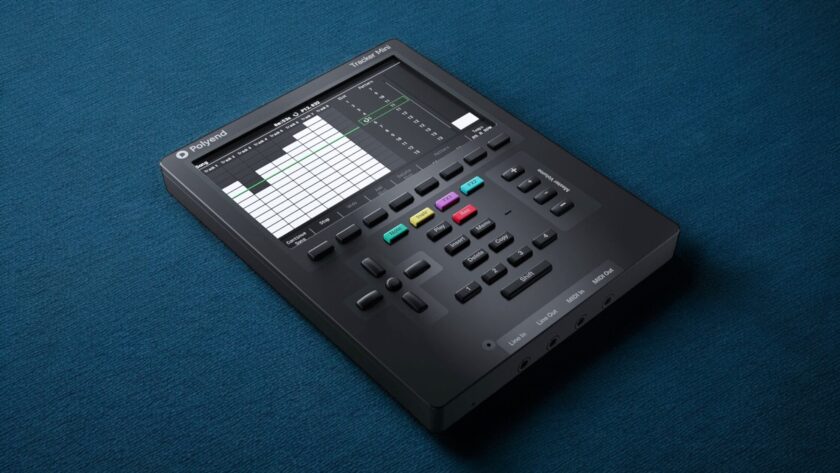
The Tracker Mini uses USB-C for power, file transfer, and multitrack audio—all with a single cable. It outputs up to 14 stereo tracks into your DAW with no need for drivers on macOS or Windows. This makes it ideal for exporting full sessions or isolating stems for mixing.
For hardware connections, it includes stereo 3.5 mm line in and out, plus TRS MIDI with adapters for full-size DIN. MIDI clock stays solid at fast tempos, and you can sequence external gear with no noticeable lag.
Play Modes and Performance
As it is a Tracker style workstation, it’s built for step sequencing and arrangement. That said, there’s a dedicated performance mode where you can trigger fills, mute and unmute tracks, shift patterns, and apply real-time effects. You won’t be finger-drumming live sets, but you can reshape a loop on the fly, shift its dynamics, and adjust mood with quick tweaks.
Song mode lets you build full arrangements by chaining patterns together. Export options include pattern or song stems, individual track bounces, and full stereo mixes. These tools let many users finish complete songs directly on the device, with no need for a DAW.
Unique Features / Differences Between Original Tracker and Tracker Mini
The Tracker Mini isn’t just smaller—it’s faster, more portable, and easier to use. It adds a rechargeable battery, boosts RAM from 8 MB to 32 MB, and includes a more powerful processor. These points make it feel like the most refined Tracker release yet—at least until the Anniversary Edition arrives.
The Tracker Mini includes a set of 8-bit-style mini-games. These mini-games, styled like old-school NES games, are under “Games” in the menu and are highly entertaining. It’s a charming touch, and a great distraction if you have a creative block and need a few moments away from a project.
Community and Support
There’s a thriving user base around the Tracker Mini. Reddit forums are active, tutorials are growing on YouTube, and Polyend has continued rolling out firmware updates with new features and fixes. This isn’t a company that abandons its products once they ship.
The learning curve exists, but help is easy to find. You can download example projects, use shared samples, or try out third-party patches. The device also rewards trial and error, so you keep learning as you go.
For users who invest time, the Tracker Mini turns into a trusted environment for writing, refining, and finishing music without distraction.
Who It’s For
The Tracker suits musicians who like structure and clear steps, over instant gratification. If you’ve used LSDJ, Renoise, or similar before, this will feel familiar.
The Tracker Mini works well for beatmakers, sound designers, and electronic musicians. It’s great for anyone who likes to experiment or needs a portable setup. The device supports focused songwriting, but also invites playful discovery. If you want to escape the DAW and work in quiet spaces, it fits that need.
Final Thoughts
If you crave being DAWless, if you enjoy building beats step by step, and if you prefer a focused workflow over endless options, this feels like the right tool. It’s especially strong for hip-hop, drum and bass, techno, and ambient producers looking to build full tracks away from a DAW.
This compact device makes it easy to create music fast, with structure and focus. Despite its size, it’s a powerful tool for production, and it has one of the best tracker screens we’ve used.
If that kind of focused tool fits your workflow, this could become your go-to companion. Highly recommended.
Check out our hardware reviews here.
