
Here’s the thing about running hardware synths into a DAW: it should be simple. MIDI has been around since 1983. Your interface has MIDI ports, your DAW sends clock, and with significant advances in tech since the 1980s, you’d hope that everything should behave predictably. Except it doesn’t, and if you’ve spent any time recording external gear, you already know this.
The headaches show up in all sorts of ways. Maybe your 808 is always a stubborn 10ms behind, no matter how much you tweak the MIDI offset. Perhaps everything feels locked in at first, only to start drifting by the time you hit bar 32. Or maybe it sounds tight until you actually record, and unexpectedly, your audio is off the grid, leaving you nudging regions around to make things line up. It’s never just one issue; it’s a whole constellation of little timing gremlins that pile up until you’re spending more time fighting sync than making music.
After hearing the buzz around the Midronome, I decided to give the Sim’n Tonic Nome II (its successor) a shot as a possible fix. Getting it running was clear-cut: I connected the Nome II to my computer via USB-C, powered it through USB bus power, and linked my DAW & the Nome to my synths & drum machines using the device’s MIDI DIN outputs. Configuring the Nome involved using the USYNC app to fine-tune synchronization settings so everything lined up perfectly on the grid. With the Nome II smoothly incorporated into my setup, it didn’t take long for it to become my trusted option for multi-hardware recording sessions.
What’s Actually Happening Here
The Nome II is, at its core, a hardware MIDI master clock. What sets it apart from the usual software solutions is how it handles the sync chain. Your DAW is heavily occupied with audio buffers, plugin processing, UI updates, and a dozen other things, so clock timing ends up low on the CPU’s priority list. The result? Jitter and latency shift around depending on how hard your system is working.
The Nome II, on the other hand, generates a rock-solid clock with less than five nanoseconds of jitter. It takes over as the master tempo reference, and everything else, your DAW included, falls in line behind it.
The key distinction is the U-SYNC implementation. On macOS, it syncs sample-accurately with your DAW over USB. The Nome is the master, your DAW follows, and your hardware follows the Nome. By inverting the usual signal chain, the Nome II reduces DAW-originated jitter.
Windows users get a different solution: a plugin that generates an audio-sync track for the Nome to listen to. Your DAW’s tempo gets translated to audio, the Nome locks to that, and your hardware locks to the Nome. It still requires one extra step, but the outcome is the same.
In practice, this means you hit record, and your hardware lands right on the grid. You might need to dial in synchronization slightly in the USYNC app to get things perfect, but once it’s set, you can forget about nudging audio regions or chasing down drift over long takes. The Nome II keeps everything locked in.
Build and Interface
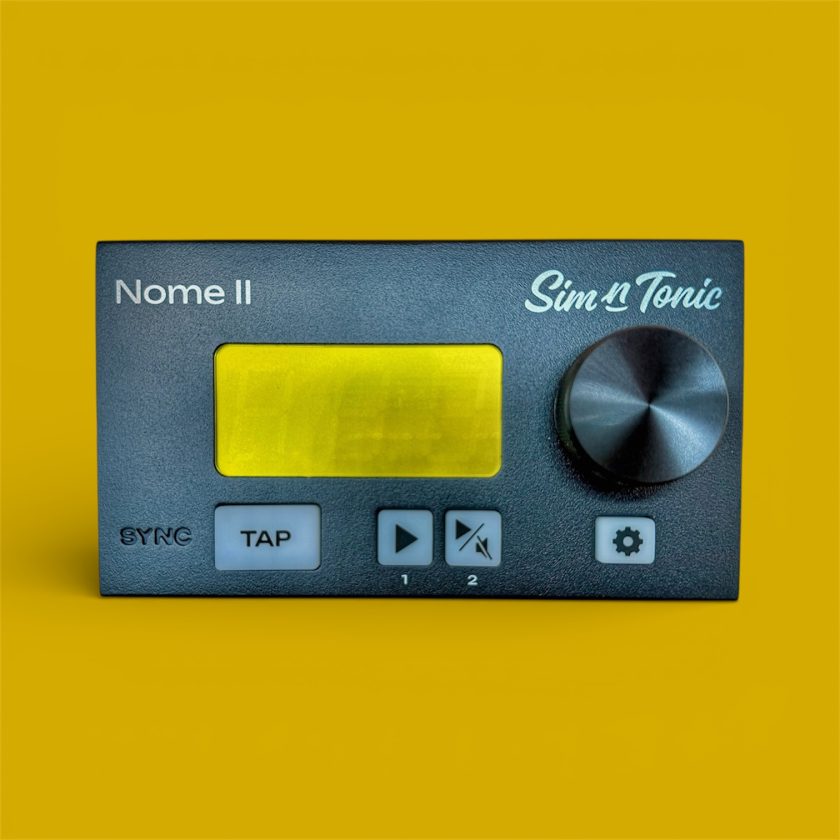
It’s compact, housed in metal, roughly the size of a large guitar pedal. The front panel features a large rotary encoder for tempo, a tap button, and play/stop controls, with a bright yellow LED screen to display the tempo.
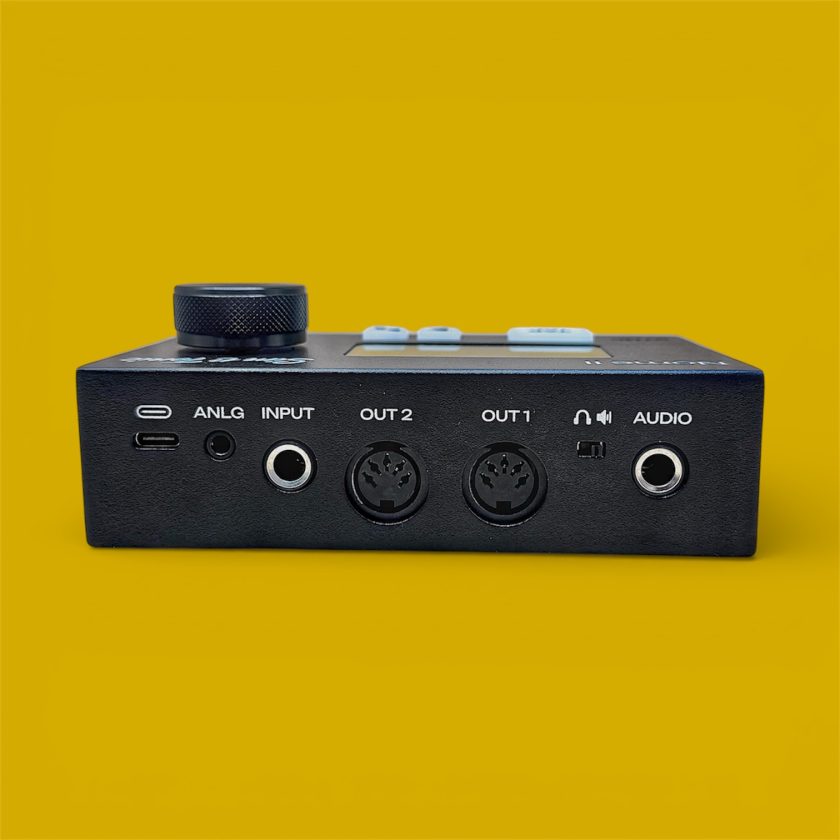
The back panel includes USB-C for power and data, two MIDI DIN outputs, a 3.5mm analog clock output, a multi-function input for a footswitch or drum pad, and a 1/4” metronome output. It runs on USB bus power, so once it’s connected to your computer and synced with your DAW, you don’t need an extra wall wart.
How It Came Together
Simon, a French musician who lives in Denmark, runs Sim’n Tonic and built the first version (Midronome) during pandemic lockdowns. His friend, Ed, needed a reliable way to sync synthesizers with a live drummer, and existing solutions weren’t holding up. The prototype, called “MIDI device for Ed,” was a bare circuit board that simply worked.
Simon continued developing the design through 2020 and 2021, then launched it on Kickstarter in 2022, achieving over 1,100 backers. The response was strong enough for Simon to launch Sim’n Tonic as a full-fledged company, and the Nome II is the direct result: a second-generation unit with improved hardware and functionality informed by real user feedback.
It is still a small operation. Simon is active on forums, responsive to questions, and closely involved in firmware development on the Nome II.
FW 2.0 added MIDI Notes Forwarding and sync to a 24ppq signal (with improved sync to DAWs). FW 3.0 introduced U-SYNC 1.0. FW 4.0 added Start/Reset for ANLG output, tempo presets, and full support for time signatures. FW 4.5 added Custom Metronome Click Sounds. FW 5.0 added Smart Tap Tempo, sync to 1–12 ppp signals, tempo decimals down to the 100th, plus Count-off and Tempo Nudging. FW 5.2 added the ability to turn off the device by holding the setup button and included fixes and internal improvements, including better Control Surface handling in preparation for bi-directional U-SYNC.
The Two Outputs Question
With only two MIDI outputs, the question arises whether this is limiting for people looking to control more than two devices. For us, we did not find it to be the case. You can split the signal using MIDI through boxes, and the clock signal remains stable enough that splitting doesn’t introduce noticeable timing issues.
The analog clock output is a real bonus, letting the Nome II play nice with gear from just about any era. You can set it to send 1-24 pulses per quarter note for modular rigs, or flip it to classic DIN Sync mode for vintage Roland boxes. Whether you’re working with modern MIDI gear, Eurorack, or old-school drum machines, you won’t need any extra converters.
Who This Is For
If your work is entirely in the box, this isn’t necessary. If you’re recording a single hardware synth occasionally, it may also be overkill.
But once your setup starts factoring in more than one piece of hardware, the Nome II begins to address real problems. Over several months, the Nome II has consistently fit into our setup as a stabilizing element, removing annoying timing quirks that reared their ugly heads at times before we gave it a try. Our testing was exclusively on macOS, which currently has the most native support, due to the USYNC app.
Setting up the Nome II with Ableton takes a few steps, but once you get it right, you can set it and forget it. While an “XL” version with more MIDI ports would be great in the future, at £179 GBP/$249 USD, it’s accessible to working musicians and serious hobbyists, avoiding the need for more expensive options like the E-RM Multiclock. As a quick note, the GBP price does not include British VAT; the usual retail price, including taxes, is closer to 218 GBP.
The Multiclock offers per-output shuffle and timing offset controls that matter in specific workflows, but those features are specialized. Midronome provided most of the essential functionality found in the E-RM Multiclock. However, some have found the Nome to be more precise, with less jitter. While the Multiclock does offer per-output latency adjustment, Sim’n Tonic hopes to add this to the Nome soon, especially since the release of the TR-1000 (which has a 50ms latency when sync’ed to MIDI Clock).
Final Thoughts
All told, the Nome II has been an essential help for us when recording demos that pack in several pieces of hardware. If you’re tired of fighting timing drift, puzzling over MIDI offset settings, or fighting against recordings that won’t line up, this box takes all that friction out of the process. It becomes an anchor in your signal chain; more consistent than any software clock and more reliable than most interface-based MIDI setups.
It’s an affordable, reliable fix for one of recording’s most persistent headaches, and I can’t recommend it highly enough.
