
When I’m not chasing Eurodance or 90s dance music drenched in complete cheese, I usually end up at the other end of the spectrum, designing hard techno tracks and industrial tracks that sit at 150 BPM and above. With those genres comes the challenge of finding brutal kicks and driving bass that, even with the right sample, don’t always deliver the feel I’m looking for.
One afternoon recently, an Instagram ad for Terminal popped up in my feed. I didn’t need much convincing. My love for distortion first, clarity second, is so destructive that all sessions now begin with a template I created, with the track faders already partially lowered so my output level has some room left once I start abusing things. Spoiler alert: I still clip things. So this kind of plugin is perfect.
Minutes after installing, I excitedly dropped the Use Caution preset on a kick (Caution? Don’t tell me what to do!), nudged Peak Freq until a pitched resonance climbed out of the attack, and found a spot where the hit growled and sang without losing the punch. A few moves through the feedback controls later, my hard techno track was already screaming bloody murder, which was exactly what I wanted.
What Terminal Actually Does
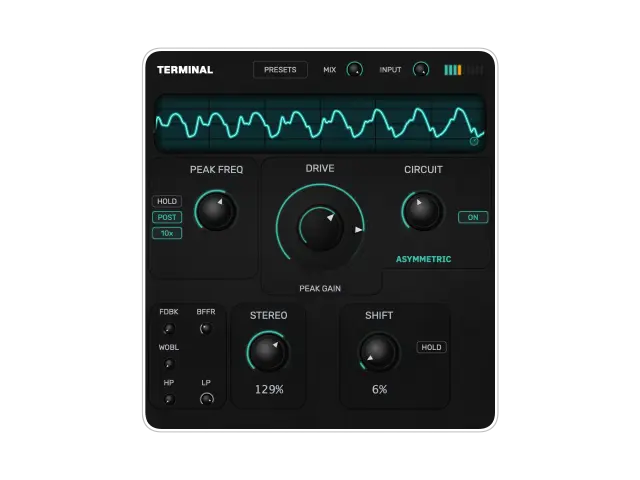
Terminal comes from Patrik Skoog, the Berlin-based producer and mixing/mastering engineer behind projects including Agaric and Headroom. At its core, it’s a distortion plugin built around six circuit types: Tanh, Germanium, Asymmetric, Wavefold, Red LED, and Blue LED. Those cover a pretty wide range before you even get into the stranger parts, from smoother saturation through harder clipping and wavefolding.
The six circuits are only part of it. A peak EQ can sit before or after the distortion, with adjustable frequency and Q. Put the boost before the circuit and the targeted range is driven harder into the distortion. Put it afterward and the EQ shapes the already-distorted signal instead. In my use, that routing choice was enough to change which harmonics jumped forward on kicks, basslines, and synths.
Then there’s the feedback section. FDBK sends the wet output back into the input, BFFR sets the delay inside that loop from 5 to 500 ms, and WOBL adds slow random pitch modulation. Terminal’s own documentation says high feedback settings can approach self-oscillation. In practice, pushing those controls took me from ordinary distortion into metallic knocks, unstable pitched tones, smeared rhythms, and eventually the kind of feedback behavior the manual describes. That’s where I spent most of my time.
The Fun Part Is Breaking It
With feedback low, Terminal worked perfectly well for me as a more conventional distortion. Kicks kept their impact, basslines took on extra grit without disappearing, and synths picked up harder edges without immediately becoming unusable. Turn the feedback up and things get considerably less polite. I heard short synth stabs stretch into moving textures, kicks produce pitched clanks and broken-machine rhythms, and bass sounds pick up harmonics that weren’t nearly as obvious going in.
The controls are surprisingly sensitive, too. In my sessions, a small movement of Peak Freq or the feedback buffer could send the sound somewhere completely different. That’s why I stopped trying to find one perfect setting and started recording passes instead.
Terminal also includes an SSB frequency shifter that shifts the left and right channels in opposite directions by up to 5 Hz per channel. The developer describes the result as stereo divergence without phase cancellation and the stereo processing as mono-safe. On material that already had a strong pitched component, I heard small settings add movement and width. Push it further and the sounds became more hollow and unstable, with feedback tones moving farther away from the starting pitch.
Every knob is automation-ready, and I used that a lot. I rode feedback for transitions, moved Peak Freq through fills, and brought the shifter in and out rather than leaving it at one value for an entire track.
It’s Easy to Pull Things Back
Destroying a sound with Terminal is easy. Getting that sound back into a usable range matters just as much, and there are a few ways to do it.
Output high- and low-pass filters help trim down low-end buildup or high-frequency harshness, while the MIX control blends the processed signal with a time-aligned dry path. Terminal describes that dry path as phase-coherent when blended.
At more extreme settings, bringing some dry signal back was often enough to let more of a kick’s transient through or make a synth’s underlying pitch easier to follow, without throwing away the mangled part I actually liked.
All of the sound-shaping controls stay on one page, so there are no tabs or subpages to dig through once things start getting out of hand. The CRT-style oscilloscope shows a dim pre-distortion trace and a brighter post-distortion trace in real time. I still made decisions by ear, but it was useful for seeing how much the waveform changed when I moved a control.
Who Should Check Terminal?
Terminal is still a new plugin, but in the two months I’ve had it, it’s already a go-to. It makes the most sense to me for producers who already own distortion plugins but want something that encourages more destructive sound design. If you need clean saturation, plenty of tools will do that. But you’ll love it and find it more interesting treating feedback, EQ, delay, pitch movement, and distortion as parts of the same process instead of separate effects.
That made it especially fun on kicks, basses, drum loops, and simple synth patches. Give it something boring, and it likely won’t stay boring for long.
At the time of writing, Terminal costs €39.99. It installs as VST3 on macOS and Windows, with AU also available on macOS. The Mac version supports Apple Silicon and Intel Macs, and TerminalVST currently offers downloadable Mac and Windows demos.
It sounds good when you use it sensibly. I still prefer it when you don’t.
Check out more plugins ici.
