
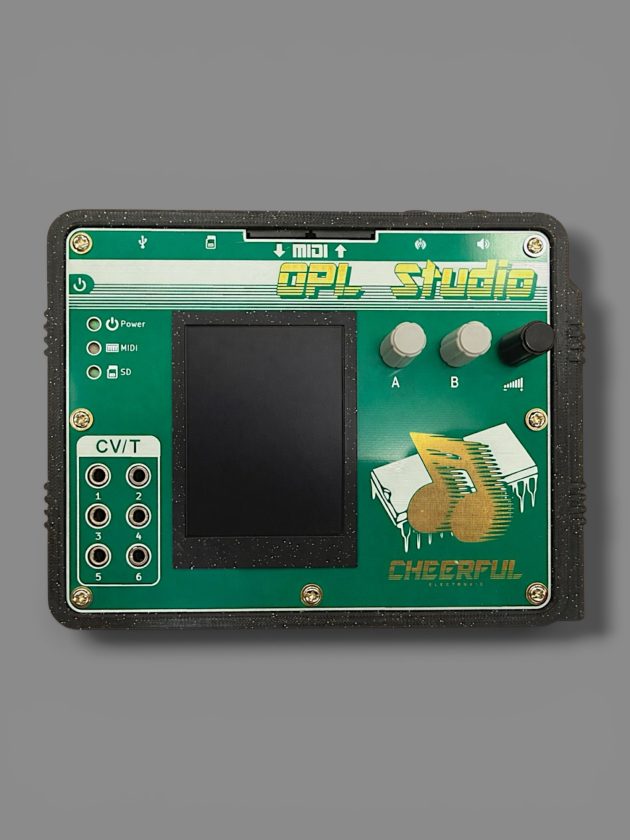
The moment I pulled the OPL Studio par Cheerful Electronic out of its box, I was hit with a wave of nostalgia. It looks like a handheld toy straight out of the 1990s, a dead ringer for those old Tiger Electronics handhelds every kid seemed to have, only now with a full color screen instead of the classic LCD sprites. That unmistakable retro vibe sets the stage perfectly for what’s to come.
I first came across the OPL Studio while browsing Tindie. I was very curious about what it promised: a full MIDI production studio, complete with its own operating system, all packed into a pocket-sized device. Intrigued, I reached out for a review unit and received one to test, with no further compensation.
Firing up the OPL Studio, I was greeted by a homemade OS that feels like a Windows 3.1 sequel we never got. The desktop is all chunky icons and clearly labeled programs: Mixer, Melody Sequencer, Drum Sequencer, Patch Editor, Composer, and there’s even a stylus tucked neatly into the case. I couldn’t resist tweaking the wallpaper color and pattern, which instantly took me back to the days before full-image backgrounds, when you’d pick a solid color and a pattern to make your PC feel like yours. OPL Studio nails that vibe.
Once I’d set things up, I dove in, poking around each program to see how it all fit together. The learning curve is gentle, and the layout clicks if you remember those early 90s Windows days. Navigating an OS inspired by software that existed decades before the first iPhones, yet with full touch functionality, is a culture mashup in the best way.
OPL Studio’s Sound: MS-DOS Esque MIDI Bliss
The built-in soundset is solid and fun to mess with, but the real magic happened when I loaded up the DOOM.OPL2 soundset. The moment those sounds kicked in, I was right back in the early faux-3D DOS era of crunchy, unmistakably retro, and barely realistic instruments: Ahh, the cheese. The basses thump with that blunt, percussive edge, and the snares hiss just like they did on those old PC speakers.
That character comes directly from the chip at the heart of the device: the Yamaha OPL3, formally designated the YMF262. Yamaha introduced it in 1992 as the successor to the OPL2 chip that powered the original AdLib card and the first Sound Blaster. Where the OPL2 gave you 9 mono FM channels with 2 operators each, the OPL3 doubled the channel count to 18, added true stereo output, and expanded the available waveforms per operator from 4 to 8. It also introduced 4-operator mode, letting you combine pairs of channels for richer, denser timbres at the cost of polyphony.
The Sound Blaster Pro 2 and Sound Blaster 16 both shipped with OPL3 onboard, which is why that era of PC gaming sounds the way it does. id Software’s DOOM used OPL2-format music data specifically because Bobby Prince wrote the score targeting the AdLib and Sound Blaster installed base, but the OPL3 plays it back with the same FM engine underneath. That’s what you’re hearing when the DOOM soundset loads on this device: 30-year-old FM data running on the chip that defined a generation of PC audio.
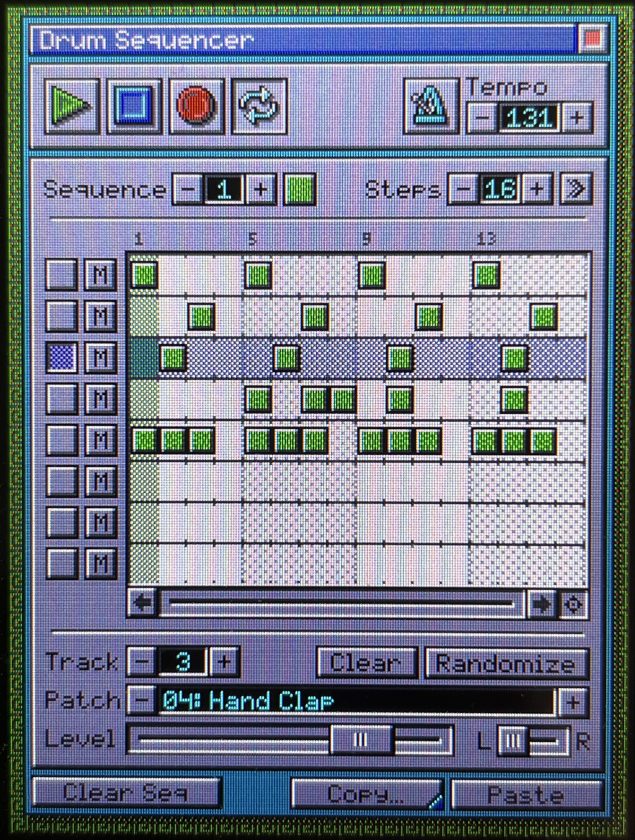
The fun thing about having a full sequencer at your fingertips is that you can push this device into whatever genre you want. Sound Blaster-meets-Chicago House energy works surprisingly well, and running patterns into the device over MIDI-in lets you build some genuinely catchy tracks. The only hiccup I ran into: if you’re sending MIDI from an external source, looping patterns can overwrite hits if the sequence fills up before you stop. That may be an issue with the DAW not communicating the loop endpoint to the OPL, but it’s still something to watch out for.
OPL Studio’s Sequencing: Simple and DAW Familiar
When building tracks by hand, sequencing is as simple as drawing notes with the stylus. It’s actually faster than you’d expect, and the stylus gives you a level of precision you don’t get with your finger on a touchscreen. The encoders make it easy to tweak parameters without constantly jumping back and forth. The whole workflow stays smooth, so you can focus on making music instead of fighting the interface. Just don’t forget: the device saves everything to an SD card, so pop one in before you start if you want to keep your work.
Finally, feel wise, in the hand, you can tell the case is 3D-printed, but it’s impressively well put together. The front panel sits extremely flush, and nothing rattles; and it’s unlikely to break unless you abuse the poor thing. To give you an idea of how perfectly everything was measured, when I took it apart to peek inside, it took a little bit of nudging to get it exact when putting it back together. Cheerful Electronic designed this down to the centimeter, and it’s solid as a result. On the software end, after two months of regular use, the OS never once crashed or froze on me and it boots up quickly when powered on.
If you grew up on early DOS games, Sound Blaster cards, or AdLib music and want a self-contained way to build chiptune tracks without firing up a computer, Cheerful Electronic’s OPL Studio is a charming way to get there. If you’re after modern, atmospheric sound design, this isn’t the tool for you, and a tracker with WAV sampling will suit you better. But for those of us who have a soft spot for this sound, it’s a genuinely fun way to make music that feels like home.
At $180 to $260, depending on where you find it, the OPL Studio is a focused, stable MIDI creation device and a surprisingly affordable way to dip your toes into making early 90s MIDI music.
Purchase the OPL Studio ici!
