
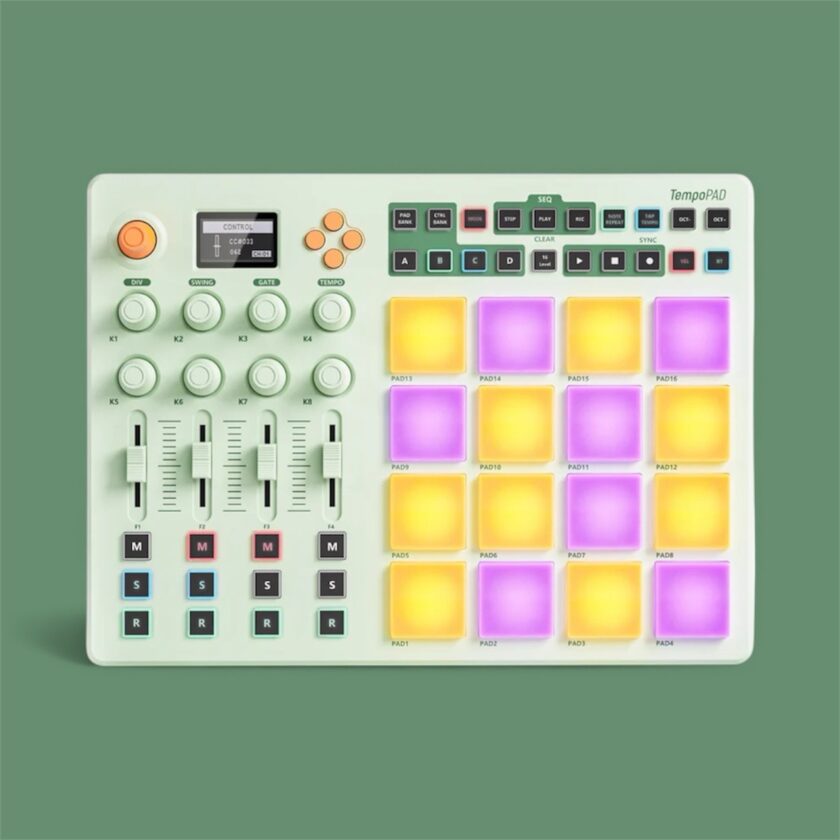
Most pad controllers follow a familiar outline. They hand you a grid, offer a few knobs, and call it a day. The Synido TempoPad C16 takes a different route. Synido fits a sixteen-pad performance surface, a functional sequencer, a broad set of controls, wireless MIDI, DIN connectivity, and an internal battery into a small chassis that works alongside a laptop, a tablet, or a compact hardware setup. It feels built for musicians who shift between several creative spaces and want a single controller that stays consistent anywhere they go.
Synido released the C16 in early 2025 without the weight of an established lineage like AKAI. But thanks to word of mouth, it gained traction quickly, thanks to a feature set that resolves several common workflow gaps. Many mobile producers keep one controller for their DAW, another for their tablet, and a third for hardware. The C16 folds all three roles into a single surface. The device incorporates Bluetooth MIDI, an internal battery, DIN in, out, and thru, an OLED display, and a sixteen-track sequencer. Instead of steering you toward one workflow, the layout remains flexible enough to shift between environments without extra setup.
Design and Build
The mint-green shell draws attention quickly, but the chassis’s weight and rigidity leave a stronger impression. It resists flexing when pressed, and the rubber feet keep it steady on a desk or stand. Every port lives on the back panel. USB-C handles power and data. Some regional versions include a 5-volt input. Three 3.5 mm TRS jacks offer MIDI In, Out, and Thru through the included adapters. This single-edge layout keeps the sides clean and simplifies placement.
Pads made of thick silicone give you a controlled, firm feel. Soft taps and harder strikes register with a clean, responsive velocity. You also get a predictable aftertouch curve when pairing the pads with compatible software or hardware. The endless encoders turn smoothly and hold their position with enough resistance to avoid accidental shifts. Four faders glide and sit in their tracks. The buttons respond with a sharp click and stay visible from different angles thanks to their bright illumination.
Synido includes a padded soft case for the controller, adapters, and a cable. It’s a small addition, yet it makes the C16 easier to carry without needing separate protection.
Features and Workflow
Operating Modes With a Clear Internal Logic
You uncover more depth on this surface than the footprint leads you to expect. Sixteen RGB pads respond to velocity and aftertouch, and you can recolor them to separate kits or roles. Four pad banks expand the number of assignments. Encoders and faders handle filters, effects, mix levels, or anything else you map to them. Twelve assignable buttons manage transport, muting, or other functions as needed.
Three operational modes dynamically adjust the layout based on your session. Keyboard Mode spreads notes across the pads for melodic work. Custom Mode lets you rebuild the entire surface around your project. Dark mode pares the feedback down to a simpler performance view. A small OLED screen shows your active mode, bank, channel, and tempo. Larger structural edits belong in the companion software, which also manages firmware updates without manual downloads.
A Sequencer That Serves Real Workflows
A sixteen-track, sixteen-step sequencer gives the C16 a role that separates it from many controllers in its range. Each track can transmit on its own MIDI channel, allowing one pattern to trigger a drum machine, a bass synth, and a tablet instrument. Recording works live or step by step. Note repeat captures fast gestures without unintended artifacts.
Some early adopters reported dropped hits during fast playing after launch. Synido traced the behavior to the initial firmware and corrected it with an update delivered through the companion app. With the current firmware installed, the pads register cleanly during fast runs.
Learning Curve and Interaction
You can load a drum kit into a DAW and start playing within minutes. The real structure of the C16 reveals itself later. Pad banks, controller banks, modes, and the sequencer interact in ways that reward spending time with the manual and editor. Once you understand how these elements connect, the controller stops feeling like a bundle of features and instead functions as a single unified surface.
During performance, the response feels controlled and steady. Velocity and aftertouch shape phrasing in ways that match your intention. Note repeat helps articulate fills. Encoders and faders adjust tone and effects. Buttons handle transport tasks without requiring constant downward glances. After you internalize the layout, the C16 functions like a compact performance desk rather than a simple pad controller.
Connectivity and Power
USB-C ensures compatibility with macOS, Windows, iPadOS, Android, and Linux without drivers. Bluetooth MIDI supports wireless work on tablets and phones and keeps latency in a workable range, though some mobile devices require an extra pairing step depending on the app. You can run long sessions without a cable thanks to the internal battery, broadening where and how you use the controller.
Three TRS jacks on the rear serve as MIDI In, Out, and Thru through the included adapters. This setup lets you build a small hardware chain where the C16 acts as the control center while still sending MIDI to a DAW over USB. Controllers this size rarely include such routing, and that extra flexibility expands the range of where the device fits.
Real-World Workflow Integration
Inside a DAW environment, the C16 becomes an effective control surface once you map it to your needs. Drums sit on the pads. Encoders shape filters, sends, or macros. Faders manage submix levels. These hands-on controls let you stay on the hardware longer and reduce reliance on a mouse.
Mobile setups highlight the controller’s strengths even more. Apps like Koala Sampler or GarageBand benefit from tactile input, and the C16 provides a level of control that touchscreen tapping cannot match. You can move around while still feeling connected to the music.
Hardware-focused musicians can place the C16 at the center of their setup. MIDI Out drives a drum machine. MIDI Thru passes the clock to another instrument. USB handles a soft synth. Encoders and faders adjust parameters across the chain. Rather than acting as an accessory, the controller becomes the workstation’s primary interaction point.
Beginners can start with simple pad triggering and gradually expand into deeper workflows. Because the interface stays consistent across modes, the learning curve remains manageable.
Veredicto final
The Synido TempoPad C16 packs an impressive amount of capability inside a compact controller. Its pads, connectivity, sequencer, and battery-powered mobility serve musicians who work across several platforms. It requires more learning than the simplest entry-level options, yet that investment leads to a device that adapts well to varied environments. With the current firmware installed, the C16 serves as a stable, versatile hub for modern hybrid workflows.
Buy TempoPad C16 Below:
For orders on Synido.com shipped to the EU: https://bit.ly/4ix61PP
