
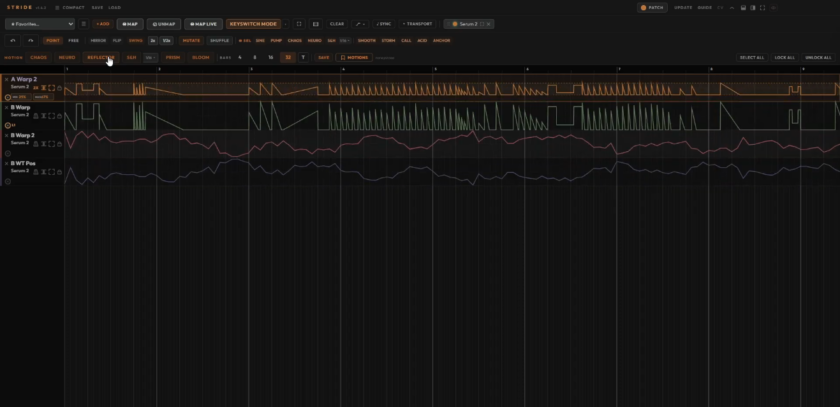
Stride is a parameter-motion tool built around fast experimentation, editable automation, and the happy accidents in between.
I am the king of the randomize button. Serum 2’s Hybridize function is dangerous for me; I’ll keep pressing it until several unrelated presets collide into something I would never have built on purpose, and Ableton’s Generators get the same treatment. Roll, listen, roll again. Every so often one catches my ear and sends the track somewhere new: little happy accidents.
When I spoke with Joe, Stride’s creator, he described a goal I immediately understood: put more happy accidents at producers’ fingertips, then give them enough control to develop those accidents over time.
Its premise is simple: map the parameters that matter, generate motion across them, listen, keep what works, and roll again. Those movements span up to 32 bars, and in Ableton, Stride places the resulting curves into a clip as automation, where they become part of the project and remain editable.
Sure, Ableton Live already has several excellent ways to introduce chance and modulation: Rack Macros have their own Randomize function, LFO and Shaper move mapped controls, and Live 12’s Generators throw new MIDI ideas into a clip. However, with Stride, that setup becomes a much shorter loop. Map the parameters, set sensible ranges, choose a motion generator, and listen. More importantly, watch as the modulation changes over time, either chaotically or steadily, depending on the automation pattern. The choice is yours.
Once you apply these ideas across a filter, oscillator position, distortion drive, delay feedback, reverb mix, pitch controls, and effect sends, the number of possible combinations can get large fast. Building those combinations by hand for each parameter is incredibly time-consuming. Here, you can make and audition changes across an entire 20-, 30-, or 50+ parameter map in under a minute. It’s an invitation to try something ridiculous to hear what happens, to chase the weird and off-the-wall.
It’s perfect for transitions where a filter might gradually open while distortion increases, where delay feedback rises late in the phrase, reverb changes more slowly, wavetable position becomes unstable near the end, and a second effect starts pulsing at a different rate, with one parameter needing a smooth curve, another needing stepped motion, and a third barely moving at all.
Different Flavors of Chaos
Chaos is the most immediate example of Stride’s workflow, populating mapped lanes with extremely varied curves in one move. Sample & Hold takes a more stepped approach, with independent rhythmic movement across lanes. Reflector creates paired relationships, useful when two parameters should move against each other, while Neuro inclines toward the elaborate rhythms associated with Neuro-style EDM.
But Mutate is one of the best tools for getting something actually unexpected. You can start with a straightforward preset like Sample & Hold, which begins fairly restrained, then push it into stranger territory as you keep reshaping and mutating the result.
I’ll use an initial preset to kick me off, then experiment with Mutate, watching it completely transform my preset in real time. Version 1.3 added separate loop points and speed controls for individual lanes, so several kinds of movement coexist inside the same setup. A short repeating gesture sits beside a slow eight-bar change without forcing both onto one timing structure.
Playing the Happy Accidents
Version 1.2 assigned Stride’s motion tools to an octave on a MIDI keyboard, with keys for Chaos, Neuro, Reflector, Sample & Hold, Prism, Bloom, Mutate, and Shuffle. Those trigger notes also record into a clip, so a later pass generates a fresh variation. The same update also added note-triggered motion, letting movement begin from incoming notes without waiting for the DAW transport.
This update came during my testing period and is one of my favorite ideas in Stride. From a keyboard, I trigger new movement while the track is running and react to what I hear; if a variation creates the right tension before a drop, I work from that moment, and the same goes for a patch that suddenly becomes completely unhinged. It fits the same mentality that made me enjoy Serum’s Hybridize feature in the first place. I’m listening for the accident. Now I can play the process that creates it.
And Version 1.3.3 pushed the integration further: The BPM, Smooth, Depth, Curve, Floor, and Ceiling controls became DAW parameters, automatable or mappable to hardware, and a Follow option mirrors Stride’s moving controls back to the DAW during playback.
Saving What Works
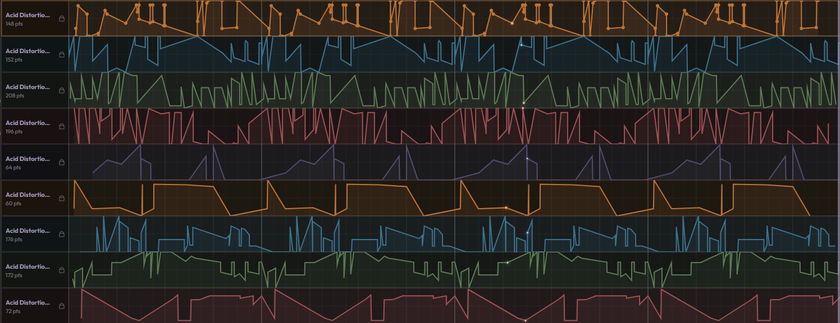
Random systems have a practical problem: eventually they produce something you wish you could get back. The brand new version 1.4.1 addresses that with Motions. A curve saves directly from its lane and turns up later in a searchable drawer with favorites and sparkline previews. Hovering over a saved Motion previews its shape against a lane before I commit, and favorite shapes stay pinned in the toolbar.
This is a neat feature because a great curve no longer has to stay attached to the sound where I discovered it. I can keep El movimiento itself and try it somewhere else later. A strange stepped pattern that worked on delay feedback today may fit wavetable position next week, while a slow curve discovered while mangling a drum loop could become the basis of a transition in another project entirely. Version 1.3 had already made entire chains reusable through Save Chain, including plugin settings, mappings, curves, ranges, colors, loops, and speeds. Motions bring that same kind of recall down to the individual shape.
Linked lanes, also new in 1.4.1, make the phrase “controlled chaos” feel a lot more concrete. Every lane has a port, and dragging a cable from one port to another ties those lanes together so moving one moves the other. Right-clicking the cable inverts the relationship, sending one parameter upward while the other moves down. Lock a linked lane, and it holds in place while the rest of its group keeps moving. A filter opens as resonance backs away. The wet level rises while the dry level falls. Oscillator-related controls drift in opposite directions.
The same update adds Compact View, turning large mappings into smaller cards with a knob, miniature lane, range indicator, and speed control. On a dense setup, I keep track of far more without scrolling through a wall of curves. And then there’s Reptile Mode: a little character sits inside Stride and points toward the matching lane when I touch a control in a hosted plugin. Cute, and kind of like that purple gorilla that was on everyone’s PC in the early 2000s. Except…without the virus.
Where It Can Go Wrong
The fastest way to make Stride sound bad is to map everything and give every lane an enormous range. It’s tempting to do this, and trust me, it’s the absolute first thing that I, and probably anyone, will do the moment they open this. That can be fun, and it can even spark unique experiments from time to time, but it can also produce complete garbage. My recommendation: instead of going automation crazy, spend a few moments tweaking the parameters in your synth or Ableton rack of choice to see exactly what sweeping the ranges will do. Pick your favorite values and automate those, leaving the rest intact for stability.
Or don’t listen to me, go nuts, and enjoy the resultant chaos. After all, Stride will do both.
Compatibility
The cross-DAW edition hosts VST3 instruments and effects inside its own chain, opening Stride’s complexity to your VST of choice. In Version 1.4.1, the AU build also carries an Audio In bus for Logic, so sidechain routing works properly there.
Stride 2.0 September Update: Joe, I Can’t Keep Up With These Updates!
There is a slightly hilarious, if not amusingly frustrating problem with reviewing Stride: Joe is shipping features faster than I can finish writing about them.
Mere days after I wrapped this review around Version 1.4.1, Stride 2.0.3 arrived and immediately made parts of what I had written obsolete. StrideBridge has now opened Stride up to Ableton devices already sitting inside a set, including Operator, Roar, Auto Filter, Echo, Saturator, and your own racks. With this new version you can map a control and it appears alongside the parameters from plugins hosted inside Stride, with the same lanes, curves, ranges, and generated movement.
Then less than a week after, before I could finish revising the article around it, Joe released 2.1. StrideLink is now gone, with StrideBridge taking over its Ableton duties, including writing generated motion into clips. The old StrideLink setup and its Python requirement disappear with it, while Bridge brings Ableton devices and Stride’s hosted plugins onto the same canvas.
Version 2.1 also adds Stride FX, a dedicated audio-effect version that can sit directly on drums, vocals, guitars, buses, or even the master and use Stride to tear apart an effects chain. It is VST3-only for now, with an AU version planned later.
There are smaller workflow changes too. Narrow parameter ranges finally use the full visual height of a lane, groups of curve points can be selected and moved together, and several drawing and range-editing annoyances have been cleaned up.
So, yes, some of the methods described earlier in this review have already changed.
Most of the changes are direct answers to workflow problems, several came from user requests, and the product I started reviewing has become noticeably more capable while I have been writing about it.
But Joe, if Version 2.2 drops before I hit Publish, I am ignoring my inbox. I kid you not, 2.1.3 just dropped right before I posted this.
Value & Verdict
At the time of writing, one purchase includes both Stride VST and StrideBridge. The current sale is $99 (regularly $129) and includes updates through version 1.x.
Stride is the perfect purchase for randomization chasers like me and anyone who enjoys generative tools, resampling, experimental sound design, evolving effects, or constantly asking, “what happens if I do this?” People who love transforming sounds with automation, but hate how long it can take to program.
You can still get incredibly manual with the controls and lanes, without relying on a simple button click to fix everything for you. But using Stride will change how quickly you transform these lanes and give you a fast way to hear dozens of possibilities before deciding which one deserves the work.
Happy accidents have always been part of making music. Sometimes an off note becomes the hook. Sometimes tweaking a knob on an old bass synth creates a whole new genre (Acid). Stride gives you more opportunities to stumble into those moments, and each update adds more ways to push them even further. It’s brilliant.
Check out more reviews aquí.
