
We received this product from EDMProd complimentary after contacting them to do a review; however, we received no financial compensation for writing this piece.
I wanted Superknobs Ultimate for the last stretch. I can already build tracks and keep ideas moving in Ableton without much friction. But the slowdown is always the same. A part is close, but it still isn’t landing, and I end up burning time chasing different ideas, exhausted, saving the session, and likely forgetting about it. Fast, one-knob moves that pull something into focus and hold me in the session were what I wanted.
Superknobs: Setup and Early Moments
The install was painless. After following the included how-to guide, all knobs appeared in the left-hand browser panel in Live, and it was right there, ready to audition on whatever I already had open.
Ten minutes in, Superknobs was already doing what I wanted. Bass and drums were the most consistent payoff. The Distort Megaracks, in particular, did something useful to the front edge of drums. With small blends, snares picked up more thwack and kicks landed harder without turning brittle.
I also found that, whether intended by the developers or not, adding a bit of effect to different parts of the track helped with separation in the mix, pulling elements forward that might have muddled with other tracks. Small moves kept parts from getting in each other’s way and gave the track more breathing room.
Controlling Superknobs
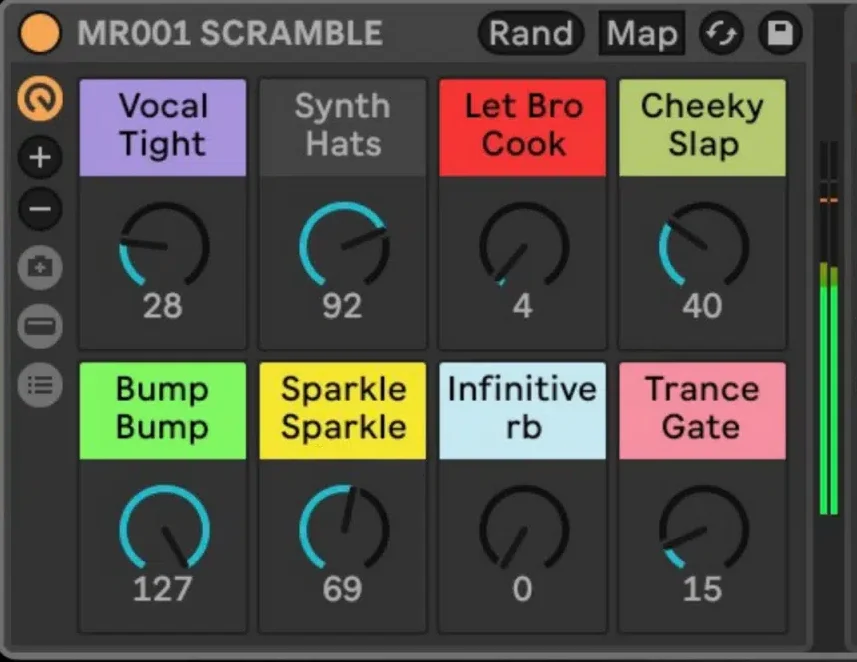
A big reason Superknobs works is the way the macros behave. Most do their work early. On a 0–127 range, 25 to 30 already gets you into the useful zone in most cases. Past 80 or 90, you’re usually into “too much.” One exception is “Pitch Chaos,” which deserves a warning label. It ramps up within the first 10 of the range, so it can get intense fast. It’s great for a sharp moment in a transition, but I wouldn’t recommend it as a full-time effect.
Control is via standard MIDI CC macros, so mapping to an external controller is simple. I’ve been testing an Audima Labs Sway for the past two months, and these knobs pair well with its motion-based control. In one session, I started waving distortion moves in and out on the bass, and it gave the section a TRON-like edge. Bold, synthetic, unmistakable.
How They Sound
The racks aren’t one flavor, either. There’s stuff for stutters and risers, grit and distortion, space and filter-style sweeps, plus some straight HP/LP moves and an acid-leaning knob. It’s not one signature stamped across everything. I liked their flexibility because, for me, the ideal outcome of using these is that they support whatever I’m already doing. I don’t want an effects kit that forces everything into one aesthetic lane. I want options that help me get the track over the line.
Some of these are mild at lower levels, and you won’t always notice them on their own, but you’ll feel their weight in the slight changes they make to the mix, like the auto-sidechain knob. How I used these varied depending on what I was working on. In acid techno, the value was pressure. Little shifts that made certain parts feel more urgent, or gave the drums more hit without wrecking the groove. When testing with House and French Touch, it leaned more toward polish. Helping parts sit, adding movement to keep things breathing, and shaping transitions so they felt natural.
A smaller subset became my go-tos, while the rest remained situational options. If I needed something specific, I knew where to look. Nothing tripped me up during my testing period. No odd behavior after saving and reopening, where the effect didn’t save. It was a great companion. Knowing what I know now, I would’ve paid full price for it if a review copy hadn’t been available.
Verdict
So here’s the simple version of who Superknobs is for. If you love building your own effects and that process is part of the fun, you may not need this. Additionally, there are a couple of compatibility points worth saying. The ‘Suite Expansion Pack’ part of Ultimate, relies on Ableton Live Suite effects, so those racks won’t load outside Suite.
Everything else is for Live 11 or 12 in Standard or Suite. Live Intro and Lite are will not work with any of these at all, due to limitations in those versions of Ableton, so if you’re on Intro or Lite, stop here. But if you already know what you want to hear, and your real problem is time, Superknobs Ultimate is the answer.
No knob will build a track from scratch or rescue a weak idea. But it will give you fast, playable finishing moves when you’re already close. If you can hear what your track is missing, and you want to get there without disappearing into a half-hour detour, Superknobs can get you back to forward motion quickly.