
We received this review unit from this.is.NOISE.inc, however, we have received no financial compensation for this review.
Having been a big fan of their MIDI controllers, and the team behind this.is.NOISE in general (they’re really nice dudes), I was excited to see their first attempt at a synthesizer.
Our earliest articles on them covered both their NM2 and NMSVE, but Gamma is actually what helped us find them in the first place, back when they demoed an early prototype before their crowdfunding campaign.
We’ve been excited for months to get our hands on this, and with everything they’ve encountered to get it to the finish line, it’s great to see it here on our doorstep. They’ve worked hard on this, and as an example of the challenges they faced: when a supply issue hit on their choice of thumbsticks, they had the option to take a cheaper, quicker route to get it out the door earlier, but they didn’t. They took the slower path to ensure they got the best parts, and in the process, made sure Gamma left their hands feeling complete. Their efforts have resulted in a great little synth.
The setup was painless until our cable tried to sabotage it…
We used Gamma in the AltWire Testing Studio, straight into a Focusrite Scarlett 18i20, monitored on V-MODA M100s.
Setup was simple: power on and go. It arrived with a partial charge (rechargeable via USB), so it was basically “turn it on and go.”
Before we had a chance to get started, there was a funny “learn from our fail” moment we feel we should share. The Gamma’s audio out is a 3.5mm headphone jack. As such, if you’re going to run this into an interface, don’t cheap out on a junk 3.5mm adapter on the end of your 1/4″ cable. We had a stash of cheap Amazon adapters lying around, and they’ve been unreliable across multiple tests. This last experience was the straw that broke the camel’s back. I tried one on the Gamma, and the distortion was so bad it sounded like we broke the synth.
Given the many issues we had with those adapters, we knew it wasn’t the synth. After we stopped being cheapasses and switched to a proper Hosa Technology 3.5mm to 1/4” cable, it cleaned up the signal massively. The synth’s actual tone showed up, and it was time to see what this little guy could do.
First ten minutes: a tiny case, an aluminum body, and a clear idea
Gamma comes with a really nice, small, padded carrying case with a handle. It’s an aluminum-bodied unit with what appears to be a glass front panel, which makes the case a nice plus for protecting the little guy from scratches.
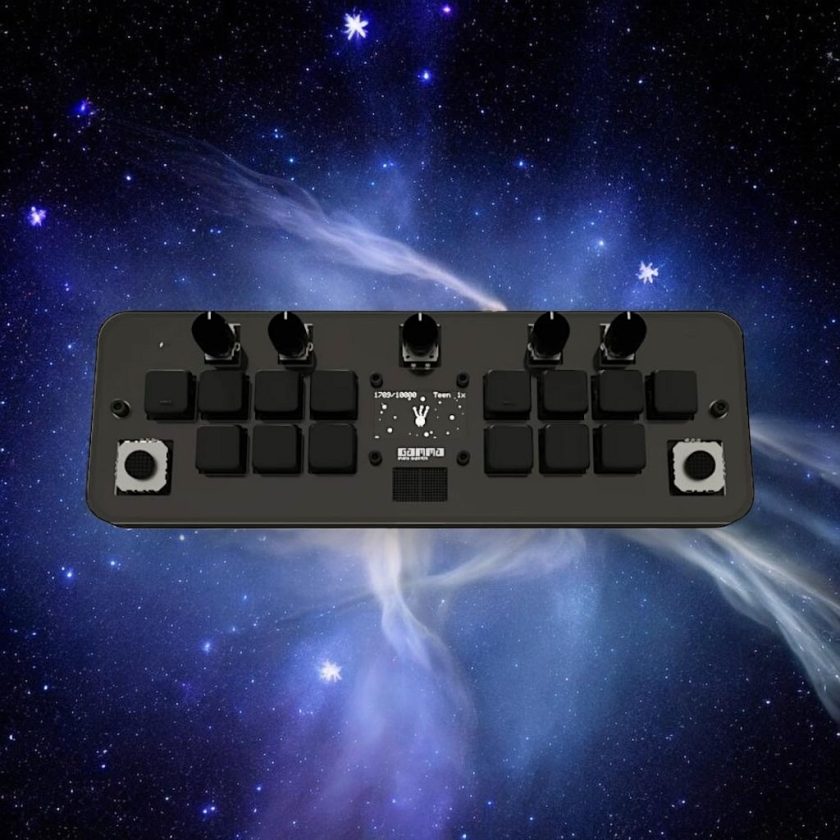
The playing surface is about the width of two iPhones laid horizontally and about as tall as an iPhone on its side. The interface consists of a black-and-white OLED screen, endless rotary knobs, and computer keyboard-style keys.
Even without labels on the device, you get the basic performance layout within a minute: left hand on chords, right hand on notes. You’re able to make nice-sounding live arrangements in seconds, and certain parameters like cutoff, key, and volume of the different parts are tweakable via knobs. It’s not truly difficult to figure out. Still, it’s best to keep the online manual open during the first session.
The thumb sticks are so tiny, but they are a great part of what makes this synth so fun. They sit where you can nudge them with one finger while you keep playing, so the chord stays under your hand while the color of the sound changes. Messing around with them revealed a neat idea that we haven’t seen in other synths we’ve tried: the direction of the thumbstick determines the effect.
On the left side, moving the thumbstick right or left toggles between Tremolo and Vibrato, and moving it up or down temporarily changes the chord octaves.
On the right side, the up/down octave behavior remains the same for the keys, but moving that thumbstick left or right while playing keys and chords together creates 7ths, 9ths, and inversions without breaking the flow.
The “chord machine” question
Gamma is already up against other similar “chord machines” in the synth space. And one of these that comes to mind quickly is Orchid.
Truth be told, we haven’t tried the Orchid yet. It looks fantastic. But the price is the part we can’t get past.
On the other hand, Gamma offers the same kind of features (chords and keys that are in tune with each other) for a fraction of the cost. Sound-wise, it’s a 10-oscillator engine with 4 waveforms, ADSR, low- and high-pass filtering, and built-in effects. Plus, the little “gammagotchi” (their take on the 90s virtual pet/Tamagotchi craze) seemed like fun.
We love the idea of these “never a wrong note” style synths and their ability to deliver great-sounding results quickly. As such, for under 300 dollars, if we weren’t lucky enough to have this sent to us, we’d still give it a try.
Pads, strings, and 8-Bit nostalgia
Gamma’s sound lands in a familiar place fast. The best patches hit like background music from an early 90s text-based cutscene. Some patches lean airy; many lean 8-bit and fizzy, with the core voice feeling digital and often a little raw. Depending on the patch, you’ll hear noise and bit crush at varying levels. Admittedly, a few of the factory patches blur together, mostly on the chord side of the patch, but the best moments come in two lanes: sparse echo-y pads that drift in and out in a dreamlike state, and classic NES-style bells. When you find a patch that combines both of them, it’s one of the best moments Gamma offers.
To MIDI or not to MIDI
If you’d like to use Gamma as a controller, you can enable MIDI Out through the main menu, connect it via USB-C to the host device, and play. The upcoming Gamma 1.1 firmware builds on that further, improving MIDI Out stability and speed, and splitting MIDI notes and chords across separate channels. There’s also a dedicated update tool linked from the official manual page.
That said, MIDI is currently one-way, as there is no option for MIDI-In. That may be a dealbreaker for anyone who sequences everything externally and wants to feed MIDI into the box.
Having expressed a desire for this feature in my conversations with them, the developers responded that it’s a goal for a future firmware, but it’s not a quick add, since they’d need to account for chord and key split behavior.
If your entire approach is to sequence everything in a DAW or a hardware sequencer and feed MIDI into the box, Gamma is going to miss the one thing you need.
The pet mechanic
I resist calling the Gamma…Gotchi a gimmick. It’s a big part of the synth’s identity, and if you’re buying Gamma, you’re probably already charmed by that idea. Thankfully, unlike its inspiration, it’s not a “pet death simulator,” or something where you have to stop to clean up poop constantly, or else your poor digital pet will get sick. Instead, it’s completely “fed” by your playing, and grows alongside your music the more you interact with Gamma. If you want to start over, you can reset it, and it cycles back after you complete the full evolution path.
It’s adorable and, at certain stages, reminded us a little bit of E.T.
Verdict
We had this particular unit comped, but it’s currently $299.99 on their site. Compared to similar chord-focused gadgets, it’s very fairly priced.
Every session with this synth was easy: key set, patch loaded, thumbsticks doing the harmonic seasoning, and usable parts coming out immediately. Gamma does exactly what it claims. It makes harmony easy and turns “messing around” into repeatedly rewarding results. As such, this product is best for someone who wants a synth that makes playing easier and gets you to a good-sounding arrangement fast, especially pads and chord beds. If the lack of MIDI-In isn’t a deterrent for you, we’re confident you’ll find this to be a great first foray into synths by the this.is.NOISE.inc crew.
See a sample of the stock presets below:
See more reviews Hier!
